
Is Creo High-End Software?

Is Creo High-End Software? Yes, Creo is generally considered high-end engineering CAD software because it supports advanced parametric modeling, direct modeling, surface design, simulation, manufacturing, model-based definition, generative design, additive manufacturing, and data-management workflows. It is not only a basic 3D modeling tool.
Creo is built for product development teams that need controlled design intent, large assemblies, manufacturing-ready geometry, and scalable engineering workflows. ProSoftStore helps CAD buyers decide whether Creo-level capability fits their work or whether a lighter CAD option would be more practical.
Quick Check
Compare engineering CAD software at ProSoftStore before choosing Creo-level CAD for product design, mechanical engineering, simulation, or manufacturing workflows.
Is Creo High-End Software?
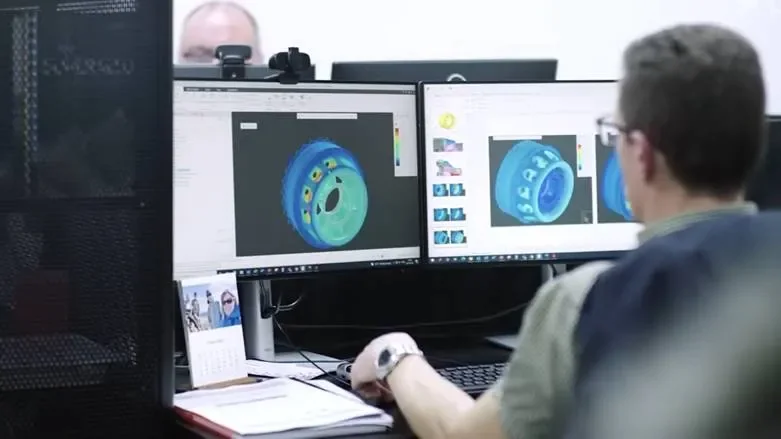
Is Creo High-End Software? Yes. PTC describes Creo as a 3D CAD platform that supports direct, parametric, and surface modeling along with simulation, manufacturing, and data-management capabilities. PTC also states that Creo combines parametric modeling with real-time simulation, model-based definition, validation, and manufacturing workflows in a single environment.
| High-end CAD factor | How Creo fits | Why it matters |
|---|---|---|
| Parametric modeling | Supports controlled feature-based design | Helps engineering changes update predictably |
| Direct modeling | Supports flexible geometry edits | Useful for imported or modified CAD data |
| Surface modeling | Supports complex product geometry | Important for housings, consumer products, and advanced forms |
| Simulation | Includes simulation-related capabilities and Ansys-powered tools | Helps validate designs earlier |
| Manufacturing | Supports manufacturing workflows and additive/subtractive design needs | Connects design to production |
| Model-based definition | Supports 3D product and manufacturing information | Reduces dependence on disconnected 2D documentation |
| Generative design | Supports topology optimization and design exploration | Helps explore weight, strength, and manufacturing constraints |
| Scalable packages | Creo packages can expand and upgrade | Allows teams to add capabilities as needs grow |
The practical answer is that Creo belongs in the high-end CAD category when the project needs more than basic modeling. If your team is designing simple printable objects or small concept models, Creo may be more capability than you need. If your team is building engineered products, machinery, tooling, assemblies, or manufacturable components, Creo’s advanced feature set can be appropriate.
Why Creo Is Considered High-End CAD?
Creo is considered high-end because it is built for professional product development, not only shape creation. PTC’s Creo package information describes Creo design packages as comprehensive 3D software for product development professionals that can be expanded and upgraded as engineering and business requirements change.
High-end CAD is usually judged by the depth of the workflow it supports. Basic CAD can create geometry. Advanced CAD helps manage design intent, downstream changes, simulation, manufacturing, documentation, collaboration, and product lifecycle needs.
For buyers comparing Creo with another serious mechanical platform, the Creo and SolidWorks engineering workflow comparison is a useful next step. That comparison helps separate general 3D modeling from controlled product design and mechanical CAD decision-making.
Creo Parametric Modeling Capabilities
Parametric modeling is one of the main reasons Creo is treated as high-end software. Parametric CAD lets engineers define features, dimensions, constraints, relationships, and design intent so the model can update when requirements change.
PTC states that Creo is a parametric 3D CAD system that supports engineers in product development with integrated design, simulation, and manufacturing functions. PTC also notes that Pro/ENGINEER, Creo’s predecessor, was initially released in 1988 as a parametric, feature-based 3D CAD system.
This matters for product teams because engineering changes are normal. A dimension may change, a bracket may need reinforcement, a housing may need wall-thickness updates, or a manufacturing constraint may require geometry changes. High-end parametric CAD helps those changes stay controlled instead of forcing manual rebuilds.
Creo Direct and Surface Modeling
Creo is not limited to one modeling style. PTC states that Creo supports direct, parametric, and surface modeling. That range matters because different engineering tasks require different approaches.
Parametric modeling is useful when design intent must be controlled. Direct modeling is useful when geometry must be changed quickly, especially imported parts or files without clean design history. Surface modeling is useful when products need complex exterior forms, smooth transitions, aerodynamic shapes, ergonomic surfaces, or consumer-product styling.
For buyers comparing model-history workflows with direct editing, the feature-history and direct-edit modeling framework helps clarify when each modeling style matters. Creo’s high-end value comes partly from supporting multiple modeling needs inside an engineering CAD environment.
Creo for Mechanical Design
Creo is most relevant when a team needs mechanical design depth. That includes parts, assemblies, drawings, design changes, manufacturing geometry, and product development workflows. PTC’s 3D CAD materials say 3D CAD helps engineers create intricate real-world object models, support virtual analysis, and automate downstream production deliverables.
This is why Creo is not usually compared with light visual modeling tools. It belongs in a mechanical CAD conversation, where teams care about part relationships, assembly behavior, materials, production documentation, and manufacturability.
For users comparing drafting tools with mechanical CAD, the drafting software and mechanical design split helps explain why a high-end CAD system serves a different role from 2D documentation software.
Creo for Simulation-Driven Design
Creo’s high-end position is also supported by its simulation workflow. PTC says Creo includes simulation capabilities, and its Creo 13 materials describe simulation-driven design with generative design and Ansys simulation tools.
Simulation-driven design matters because teams can evaluate design behavior earlier. Instead of waiting until late-stage testing, engineers can use simulation tools to explore stress, performance, optimization, or design alternatives earlier in the CAD process.
That does not mean every Creo buyer needs every simulation capability. A small design team may only need basic validation. A larger engineering team may need deeper analysis, generative design, topology optimization, or Ansys-connected workflows. The right choice depends on project complexity.
Creo for Model-Based Definition
Model-based definition is another high-end CAD signal. PTC’s Creo materials state that Creo 13 strengthens the product lifecycle with expanded model-based definition, and PTC positions Creo around model-based product development.
MBD matters when the 3D model becomes the central source for product and manufacturing information. Instead of relying only on separate 2D drawings, teams can attach dimensions, tolerances, annotations, and manufacturing information directly to the 3D model.
For advanced manufacturers, this can improve clarity between design, inspection, production, and suppliers. It also shows why Creo is more than a basic modeler. MBD is a workflow-level capability for teams that need controlled product definition.
Creo for Manufacturing Workflows
Creo is high-end because it connects design with manufacturing needs. PTC describes Creo as supporting manufacturing workflows in the same advanced CAD environment, and PTC’s 3D CAD page mentions capabilities such as CAM, additive manufacturing, multi-CAD, composites, surfacing, and ergonomics.
Manufacturing support matters because a model must eventually become a real product. The CAD system should support geometry quality, production constraints, downstream documentation, and manufacturing communication.
For buyers comparing design geometry with machining preparation, the CAD-to-CNC workflow difference is useful. Creo can support design and manufacturing-oriented workflows, but shops may still use separate CAM tools depending on machine programming needs.
Creo for Additive Manufacturing
Creo also supports additive manufacturing workflows. PTC’s additive manufacturing page says design-for-additive-manufacturing software like Creo helps ensure parts are built efficiently through metal or polymer processes, and it references lattice structures, topology optimization, generative design, and simulation inside Creo.
That matters for teams designing lightweight components, complex internal structures, custom parts, or additively manufactured prototypes. Basic modeling software may export a printable file, but high-end CAD helps control engineering requirements before the part is printed.
For buyers focused on simpler printing needs, the entry-level printable CAD workflow guide may be enough. Creo is more relevant when 3D printing becomes engineering-driven rather than hobby-level output.
Creo for Generative Design
Generative design is another advanced Creo capability. PTC documentation says generative design can autonomously generate close-to-manufacture-ready designs based on engineering parameters, goals, constraints, loads, and manufacturing processes.
This is a high-end capability because it changes how engineers explore design options. Instead of manually modeling one geometry at a time, the software can help evaluate optimized forms based on performance and manufacturing constraints.
Generative design is not necessary for every CAD user. But when a team works with weight reduction, strength, additive manufacturing, or structural efficiency, this capability can support advanced product development.
Creo Packages and Scalability
Creo is also high-end because it can scale by package and extension. PTC says Creo packages provide comprehensive 3D software that can be expanded and upgraded as engineering and business requirements change.
This scalability matters for growing teams. A company may start with core 3D design needs, then later add simulation, manufacturing, model-based definition, additive manufacturing, or other specialized modules.
For buyers comparing software cost and licensing, the CAD license planning and cost factors can help. High-end CAD should be judged by the capabilities the team actually needs, not by buying the most complex package by default.
Creo vs Basic CAD Software
Creo is different from basic CAD software because it is intended for deeper engineering workflows. Basic CAD may be enough for simple drawings, conceptual geometry, or lightweight 3D objects. Creo is more suitable when controlled mechanical design, product structure, advanced manufacturing, simulation, or MBD matters.
For buyers who need to understand the wider CAD market, the CAD software category map helps explain why CAD tools vary so widely. A 2D drafting tool, a visual modeler, a CAM system, and a high-end parametric CAD platform all serve different needs.
The right question is not only “Is Creo High End Software?” It is “Do my projects require high-end CAD capability?” If the answer is no, a lighter CAD tool may be more efficient. If the answer is yes, Creo belongs on the shortlist.
Creo vs AutoCAD Category Fit
Creo and AutoCAD are both CAD-related tools, but they are not the same category. Creo is a parametric 3D CAD platform for engineering product development. AutoCAD is widely used for precise 2D and 3D drafting, design, modeling, and documentation.
A buyer comparing these categories should review the Creo and AutoCAD category comparison. That distinction matters because a drafting-first tool and a high-end mechanical CAD platform solve different problems.
If the workflow is mostly drawings, plans, layouts, and annotations, Creo may be more than needed. If the workflow is complex mechanical design, assemblies, simulation, manufacturing, and model-based definition, AutoCAD-style drafting alone may not be enough.
Creo vs General 3D Modeling Software
General 3D modeling software can be useful for visual models, conceptual geometry, architectural massing, printable objects, and presentation work. Creo is more engineering-driven. It is built for product definition, controlled changes, assemblies, simulation, and manufacturing-related workflows.
The 3D modeling software selection framework helps buyers separate visual modeling from engineering CAD. This is important because “3D modeling” can mean very different things depending on the output.
Creo is high-end when the model must become a controlled product, not just a visual object. That is the key difference between professional engineering CAD and general-purpose modeling.
Creo and CAD Software Types
Creo belongs in the parametric 3D CAD and advanced engineering CAD categories. It may also connect with direct modeling, surface modeling, simulation, manufacturing, MBD, and additive manufacturing workflows.
For buyers still learning the market, the major CAD type classification can help place Creo in the right category. A buyer should not compare Creo directly with every CAD program on a list; it should be compared with tools built for similar engineering requirements.
This prevents overbuying and underbuying. A hobbyist may not need Creo. A manufacturer designing controlled product lines may need exactly the kind of high-end capability Creo provides.
Creo for Construction and Architecture
Creo is not usually the first choice for construction documentation or architectural floor plans. Architecture and construction workflows often need plans, elevations, sections, site documentation, building objects, and drawing coordination.
For construction buyers, the construction CAD workflow filter is more relevant than a high-end mechanical CAD comparison. For architecture buyers, the residential architecture CAD comparison may be more useful.
Creo may still appear in construction-adjacent workflows when products, equipment, fixtures, mechanical components, or manufactured assemblies are involved. But for building documentation, a different CAD category is usually more appropriate.
Creo for Visual Design and Concept Modeling
Creo can support advanced product modeling, but it is not usually chosen only for fast visual massing or loose concept sketches. Visual design teams may prefer simpler concept-modeling tools when the goal is client communication rather than engineered product definition.
The visual concept CAD comparison helps explain why a visual modeler can be better for quick design communication. Creo is better suited when the concept must move into controlled engineering.
That does not make Creo less capable. It simply means high-end CAD should be chosen when the workflow requires high-end control.
Creo for Technical Computing and Analysis Workflows
Creo can support simulation and engineering workflows, but it should not be confused with technical computing platforms. MATLAB-style tools are used for calculations, algorithms, data analysis, and system modeling, while Creo is used for CAD geometry and product development.
The engineering analysis and CAD role comparison helps clarify where technical computing fits beside CAD. Engineering teams may use multiple tools: one for calculations, one for CAD, one for simulation, and one for manufacturing.
Creo’s value is in engineering CAD, not replacing every analysis or calculation environment.
Creo Version Updates and High-End Features
Creo’s newer releases continue to reinforce its high-end position. PTC announced Creo 13 and Creo+ 13.3 on June 10, 2026, with Creo AI Assistant and enhancements across model-based product development, simulation-driven design, manufacturing, surfacing, sketching, sheet metal, welding, and multi-body design.
PTC’s “What’s New” page also says Creo 13 strengthens the product lifecycle from design through production through AI-assisted user experience, productivity enhancements, expanded MBD, and advanced manufacturing.
For buyers reviewing an older version path, the Creo 11 feature update notes can help show how version changes may affect engineering workflows.
Creo Compared with Other Mechanical CAD
Creo should usually be compared with other mechanical CAD platforms, not with every design tool on the market. SolidWorks, Inventor, and similar platforms are more relevant comparisons than basic drawing software.
For buyers comparing product-development platforms, the mechanical CAD release context can help frame how mechanical CAD releases change over time. High-end CAD decisions should include version support, feature depth, collaboration, manufacturing requirements, and training.
Creo’s high-end status does not mean it is always the right answer. It means the software is built to serve demanding engineering use cases.
Creo and 3D Printing Workflows
Creo can support advanced 3D printing workflows, especially when additive manufacturing is tied to engineering requirements. PTC’s additive manufacturing materials reference lattice structures, topology optimization, generative design, and simulation as part of Creo’s additive workflow.
However, 3D printing also requires a slicer and printer preparation workflow. The CAD model and slicer workflow separation helps explain the difference between designing a model and preparing it for printing.
If buyers expect the printer package to include full design tools, the printer software bundle clarification can help set the right expectations.
Creo and Manufacturing Alternatives
Creo’s manufacturing capabilities make it relevant for advanced product development, but some manufacturing teams may also evaluate dedicated CAM systems depending on machining needs. CAD creates and controls geometry; CAM prepares machine operations and toolpaths.
For shops comparing software in that area, the CAD CAM machining software comparison provides useful context. Creo may support integrated manufacturing workflows, but dedicated CAM may still be needed for specific machine programming environments.
Teams evaluating manufacturing updates can also review the CAM version evaluation framework to understand how CAM changes differ from CAD feature updates.
When Creo Is the Right Fit?
Creo is the right fit when the project needs controlled 3D mechanical design, parametric changes, complex geometry, assemblies, simulation-driven decisions, MBD, manufacturing connection, or additive manufacturing capability. It is also a good fit when a team expects CAD needs to grow over time.
This makes Creo especially relevant for product manufacturers, machinery designers, tooling teams, industrial equipment companies, engineering departments, and teams that must connect design to downstream production.
If your team needs advanced product development capability, ProSoftStore can help compare 3D mechanical CAD software options that match those engineering requirements.
When Creo May Be More Than You Need?
Creo may be more than you need if the work is mostly simple 2D drafting, basic 3D sketches, hobby modeling, visual presentation, or lightweight 3D printing. In those cases, the cost, training, and workflow depth of high-end CAD may not be justified.
The better approach is to match software complexity to the deliverable. If your deliverable is a simple drawing, choose drafting-focused software. If your deliverable is a visual model, choose visual modeling software. If your deliverable is a controlled mechanical product, Creo-level CAD becomes more relevant.
ProSoftStore helps buyers avoid both mistakes: buying too little software for serious engineering work or buying too much software for simple design tasks.
How ProSoftStore Helps Buyers Choose?
Is Creo High End Software? Yes, Creo fits the high-end CAD category because it supports advanced parametric modeling, direct and surface modeling, simulation, manufacturing workflows, model-based definition, generative design, and additive manufacturing. The more important question is whether your project actually needs that depth.
ProSoftStore helps buyers compare CAD software by output: mechanical parts, assemblies, drawings, manufacturing files, 3D printing models, simulation-ready geometry, or construction documents. That keeps the buying decision tied to real work.
If your team needs engineering-grade design control, ProSoftStore can help you compare engineering CAD software and choose a CAD license that fits your product development workflow.
FAQs
Is Creo High End Software for mechanical engineering?
Is Creo high-end software? Yes, for mechanical engineering workflows, Creo is generally considered high-end because it supports parametric modeling, direct modeling, surface modeling, simulation, manufacturing, and data-management workflows. PTC describes Creo as supporting engineers in product development with integrated design, simulation, and manufacturing functions. That makes it more suitable for controlled mechanical design than basic drafting or visual modeling tools.
Is Creo high-end software compared with AutoCAD?
Is Creo High End Software compared with AutoCAD? In mechanical product development, yes, Creo sits in a different CAD category from AutoCAD. AutoCAD is widely used for precise drafting, drawing, and general CAD documentation, while Creo is focused on parametric 3D engineering, assemblies, manufacturing workflows, simulation, and product definition. The better choice depends on whether the work is drawing-centered or product-development-centered.
Is Creo high-end software for simulation?
Is Creo High End Software for simulation-related design? Creo has high-end simulation-related capabilities because PTC positions Creo around simulation-driven design, Ansys simulation tools, and design validation workflows. Creo is not a replacement for every specialized analysis tool, but it can support simulation earlier in the CAD process. That makes it valuable when engineers need feedback before late-stage prototyping.
Is Creo High End Software for manufacturing?
Is Creo High End Software for manufacturing workflows? Yes, Creo supports manufacturing-related workflows, and PTC describes Creo as including manufacturing capabilities alongside design, simulation, MBD, and related tools. This matters when CAD geometry must support production, additive manufacturing, CNC-related preparation, or downstream deliverables. Teams with machine-specific needs may still use dedicated CAM software, but Creo belongs in advanced design-to-manufacturing discussions.
Is Creo High-End Software for 3D printing?
Is Creo High-End Software for 3D printing? Creo is high-end when 3D printing is engineering-driven, such as lattice structures, topology optimization, generative design, simulation, and metal or polymer additive manufacturing. PTC describes Creo additive manufacturing workflows around efficient part building, topology optimization, generative design, and simulation. For simple hobby prints, Creo may be more capability than needed.
Is Creo High-End Software for beginners?
Is Creo High-End Software for beginners? Creo can be learned by beginners, but it is not usually considered a lightweight beginner-only tool. Its value comes from advanced engineering functions such as parametric modeling, assemblies, manufacturing, simulation, MBD, and scalable packages. A beginner learning professional mechanical CAD may benefit from Creo, while a hobbyist who only needs simple shapes may prefer a simpler CAD tool.
Is Creo High End Software worth the cost?
Is Creo High-End Software worth the cost? It can be worth the cost when the team needs controlled product development, advanced modeling, simulation, manufacturing workflows, MBD, or additive manufacturing. It may not be worth the cost for simple drafting, basic models, or occasional hobby projects. Buyers should compare the license against training, workflow savings, downstream production needs, and project complexity.
Is Creo High End Software or just regular CAD?
Is Creo High-End Software or just regular CAD? Creo is more than regular basic CAD because it supports advanced engineering workflows such as parametric design, direct modeling, surface modeling, simulation, manufacturing, model-based definition, generative design, and additive manufacturing. PTC describes Creo as a 3D CAD platform for product design, engineering, and manufacturing with integrated capabilities across the product workflow.