
Is GibbsCAM 2025 Better Than 2024?
Is GibbsCAM 2025 better than 2024? For many CNC programming and production machining workflows, GibbsCAM 2025 is the stronger release because it adds AI support, OptiThreading, Rib Cut Plunge, facet-body editing, better simulator controls, multi-flow visualization, and improved tool-management workflows.
GibbsCAM 2024 was already a major update, especially for CoroPlus Tool Library integration, digital connectivity, tooling flexibility, and milling improvements. The better choice depends on your shop’s machines, turning needs, fixture strategy, tool libraries, simulation habits, and upgrade timing. ProSoftStore helps buyers compare CAD/CAM software by real machining workflow instead of release-year hype.
Quick Check
Compare CAD/CAM software for machining at ProSoftStore before choosing GibbsCAM 2025, GibbsCAM 2024, or another CAD/CAM workflow for machining, programming, and production work.
Is GibbsCAM 2025 Better Than 2024?
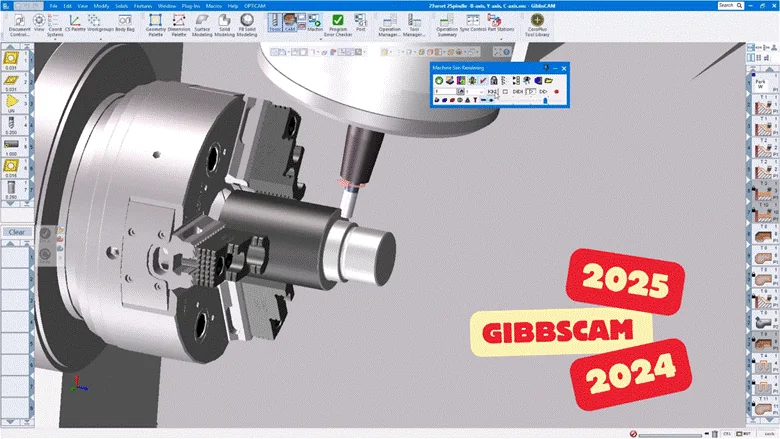
Is GibbsCAM 2025 better than 2024? In feature depth, yes, GibbsCAM 2025 adds several important capabilities on top of the 2024 foundation. GibbsCAM’s official 2025 announcement says the release introduced AI features, GibbsCAM Copilot, enhanced Y-axis turning, Sandvik OptiThreading, Rib Cut Plunge, facet-body modeling tools, multi-flow operation visualization, tool-ordering improvements, and simulator enhancements. GibbsCAM’s 2024 page, by comparison, focused on CoroPlus Tool Library integration, fixture stacking, licensing changes, virtual points, taper and curvature visualization, tooling flexibility, milling improvements, and 5-axis enhancements.
| Comparison area | GibbsCAM 2024 | GibbsCAM 2025 | Practical meaning |
|---|---|---|---|
| Tooling data | CoroPlus Tool Library integration | Expanded tool-ordering workflow from libraries | 2025 builds on tool-library value |
| Turning | PrimeTurning and rotary-axis-related improvements | OptiThreading, enhanced Y-axis turning, Rib Cut Plunge | 2025 is stronger for advanced turning |
| AI | Not the main release theme | GibbsCAM Copilot and up2parts autoCAM plug-in | 2025 adds AI-assisted support and programming |
| Simulation | Fixture stacking and collision-checking improvements | Stop-before-operation, Sync Manager progress bar, Rotary Hint, default collision alerts | 2025 improves review and safety visibility |
| Facet bodies | Not the main emphasis | New Facet Body Modeling palette and more FB support | 2025 is stronger for mesh/facet-based workflows |
| Milling | Rest machining, 5-axis stepover, geodesic and multiaxis improvements | Continues broader machining improvements | 2024 remains meaningful for milling users |
| Multi-task machining | Existing MTM strength | New Operation Tile Modes for multi-flow visibility | 2025 improves complex MTM organization |
| Upgrade value | Strong release for tool libraries and milling | Stronger release for AI, turning, simulation, and geometry prep | Upgrade depends on shop workflow |
The practical answer is not that every shop must upgrade immediately. GibbsCAM 2025 is better when your workflow benefits from AI help, automated NC-programming assistance, advanced turning, facet-body editing, improved simulation review, or MTM visibility. GibbsCAM 2024 may still be enough if your shop mainly needed CoroPlus integration, milling updates, and tooling flexibility.
GibbsCAM 2024 Built the Foundation
GibbsCAM 2024 was not a minor release. GibbsCAM described it as a version that strengthened core productivity and digital connectivity. The release integrated Sandvik Coromant’s CoroPlus Tool Library, giving users access to cutting-tool data, 3D tool and holder models, and recommendations based on ISO 13399 cutting-tool data exchange.
That mattered because tool selection and cutting data affect programming time, setup confidence, repeatability, and machining quality. A shop using verified tool data can reduce guesswork, especially when programming repeat jobs or standardizing across locations.
GibbsCAM 2024 also improved fixture stacking, retained unused fixtures for simulation and collision checking, replaced historic CLM licensing technology, added virtual-point interrogation for geometry dimensioning, and introduced taper/draft and curvature visualization. These updates helped users work more directly with CAD data and machining setups.
For buyers comparing CAD/CAM workflow roles, the CAM programming and CAD drawing handoff is useful. GibbsCAM belongs in the production programming side of the workflow, not simple drafting alone.
GibbsCAM 2025 Added AI Support
The biggest headline change in GibbsCAM 2025 was AI. GibbsCAM announced that version 2025 introduced GibbsCAM Copilot, which is accessible from the Online Help menu and uses Microsoft Azure OpenAI on a dedicated GibbsCAM-trained database to provide rapid user support.
This matters because CAM programmers often lose time searching documentation, checking procedures, or asking for first-line support. If Copilot helps users find relevant manufacturing and software guidance faster, it can reduce interruption during programming. That does not replace programmer judgment, but it can improve access to help.
GibbsCAM 2025 also added a plug-in to up2parts autoCAM. GibbsCAM says the plug-in can use 3D models with tolerance information to generate proposals and recommendations for six-sided machining, including clamping, machining steps, operations, and tools through AI technology.
That makes GibbsCAM 2025 stronger than 2024 for shops interested in AI-assisted programming and automated process proposals.
GibbsCAM 2025 Improved Turning
Turning is one of the clearest reasons GibbsCAM 2025 may be better than 2024. GibbsCAM’s 2025 announcement says the release added support for Sandvik OptiThreading and continued work around enhanced Y-axis turning. It also describes Y-axis turning as improving stability, chip control, surface finish, and cutting speeds by directing cutting forces into the milling spindle.
GibbsCAM 2025 also introduced Rib Cut Plunge, a roughing strategy designed to reduce tool deflection, improve tool life, and support chip control by plunging repeatedly into the part at full engagement before removing remaining ribs at a higher feed.
For shops using advanced turning, mill-turn, Swiss, or multitask machines, those changes can matter more than general interface updates. GibbsCAM 2024 had meaningful turning and tooling improvements, but GibbsCAM 2025 is more clearly focused on next-step turning technology.
For broader mechanical CAD context, the mechanical CAD assembly comparison baseline helps explain why mechanical design and machining preparation are connected but different workflow stages.
GibbsCAM 2025 Added Swiss-Type Improvements
GibbsCAM 2025 also added a new headstock-origin option for Swiss-type machining. GibbsCAM says this lets NC programmers define the distance between the front of the guide bushing and the headstock’s zero position, making simulation-body positioning easier on the headstock axis.
That is a practical shop-floor detail. Swiss machining often depends on accurate machine simulation, correct coordinate definitions, and confidence that programmed motion reflects actual machine behavior. A small workflow improvement in coordinate setup can reduce confusion during programming and review.
GibbsCAM 2024 already supported advanced machining workflows, but GibbsCAM 2025 appears more focused on specific production-machine scenarios such as turning, Swiss, and MTM visibility.
GibbsCAM 2025 Improved Simulation Review
Simulation improvements are another reason GibbsCAM 2025 can be better than 2024 for production shops. GibbsCAM says the 2025 simulator added a stop option that pauses before each operation, a scrolling bar in the Sync Manager for MTM progress feedback, Rotary Hint to graphically show spindle direction for turning and milling, and collision detection with alerts activated by default.
Those changes matter because CAM simulation is not a presentation feature. It helps programmers check motion, spindle direction, collision risk, operation order, and setup logic before code reaches the machine.
GibbsCAM 2024 also improved simulation-related workflows through fixture stacking and collision-checking support. However, GibbsCAM 2025 extends review control and visibility in ways that are useful for complex programs.
For users comparing CAM with mechanical design software, the drafting CAD and product model basics can help clarify where design geometry ends and production verification begins.
GibbsCAM 2025 Improved Multi-Flow Visibility
Multi-task machining can become difficult to review because several flows may be active across spindles, turrets, heads, and machine channels. GibbsCAM 2025 added Operation Tile Modes that display multiple flows independent of the MTM Sync Manager. Users can show all flows, show each flow, or use Sync Flow Mode to coordinate displays across operations.
This is a practical improvement for MTM users because visibility affects programming confidence. When operations are easier to view and organize, programmers can review synchronization and process order more clearly.
GibbsCAM’s broader product page states that GibbsCAM supports complex machining centers, MTM workflows, toolpath simulation with collision detection, and interoperability with common CAD systems. That broader positioning helps explain why multi-flow visibility is important in a CAM package.
GibbsCAM 2025 Added Facet Body Modeling
GibbsCAM 2025 also improved how users handle facet bodies. GibbsCAM says its new Facet Body Modeling palette supports editing functions such as Tesselate, Simplify, Re-facet, Heal, and Smoothing, and that many existing solid-modeling functions now support facet bodies, including Booleans, Slice, Separate, Offset/Shell, and History.
That matters because modern shops often receive geometry from many sources. Facet or mesh-like data may come from scanned models, STL workflows, fixtures, machine components, or in-process stock models. Being able to work with those bodies inside GibbsCAM can reduce the need to move between external CAD tools.
For shops that regularly prepare messy or imported geometry, the direct-edit modeling for simulation prep is relevant. Direct editing and geometry repair can be just as important as original model creation.
GibbsCAM 2025 Improved Tool Management
GibbsCAM 2024’s CoroPlus Tool Library integration was already important. GibbsCAM 2025 extended tool workflow value with a new Order Tool feature. GibbsCAM says this feature uses tool-library information such as item/catalog number and manufacturer, gathers the data through catalog integrations, and can direct users to purchasing or ordering pages from the tool-library site where the tool originated.
That is useful for shops that want tighter links between CAM programming, tool selection, purchasing, and standardization. A programmer may select a tool in the CAM environment, but the shop still has to confirm availability, ordering, and repeatability.
GibbsCAM 2024 gave users better access to verified cutting-tool data; GibbsCAM 2025 appears to make the tool workflow more actionable by connecting tool information with ordering paths.
GibbsCAM 2024 Still Matters for Milling
A fair GibbsCAM 2025 vs 2024 comparison should not dismiss 2024. GibbsCAM 2024 included important milling improvements. The official 2024 page mentions improved rest machining with contouring and pocketing, smoother ramping, mill cutoff processes, variable-depth engraving, optimized 5-axis stepover, improved geodesic operations, 3D containment management, point distribution, ramp offsets, user-defined start points, and tool tilting during helix entries.
That means GibbsCAM 2024 may already have solved important problems for shops focused on milling, 5-axis finishing, variable-depth engraving, and advanced toolpath control.
GibbsCAM 2025 may be the more advanced release overall, but a shop upgrading from older software to 2024 may still gain meaningful milling productivity. The upgrade decision should depend on whether the shop needs 2025-specific features, not only the fact that 2025 is newer.
GibbsCAM 2025 for AI-Assisted Programming
The up2parts autoCAM plug-in is one of the most forward-looking GibbsCAM 2025 additions. GibbsCAM says it can generate proposals and recommendations for six-sided machining using 3D models with tolerance information, including clamping, machining steps, operations, and tools.
This does not mean experienced CNC programmers become unnecessary. Manufacturing still requires judgment about workholding, machine capability, material behavior, tool life, post-processors, tolerances, and inspection. However, AI-assisted proposals can reduce early programming time and help standardize process planning.
If a shop is trying to reduce repetitive CAM setup time, GibbsCAM 2025 is more attractive than 2024. If the shop has no tolerance-rich models or no interest in AI-assisted programming, the immediate value may be lower.
GibbsCAM 2025 for Safety and Collision Review
GibbsCAM 2025 improves simulation safety review by making collision detection and alerts active by default. It also adds the stop-before-operation option and Rotary Hint for spindle-direction visibility.
This matters for complex CNC machines because mistakes can damage tools, fixtures, spindles, workpieces, and machines. CAM software cannot remove every risk, but better default alerts and clearer simulation review can help programmers catch issues sooner.
For buyers thinking beyond CAM into full mechanical design, the high-end CAD capability checklist helps show why advanced manufacturing workflows often require both strong design software and strong verification workflows.
GibbsCAM 2025 for Shops With Mixed CAD Data
GibbsCAM states that its software integrates with major CAD systems and supports 2- to 5-axis milling, turning, Swiss machining, MTM, and wire EDM.
That matters because machine shops often receive files from many sources. A customer may send native CAD, neutral CAD, faceted bodies, fixtures, or simplified models. GibbsCAM 2025’s facet-body tools make it stronger for handling nontraditional or mesh-like geometry without always leaving the CAM environment.
For buyers still separating design systems from CAM systems, the parametric CAD and drafting workflow boundary helps explain why CAD tools and CAM tools may both be necessary in one shop.
GibbsCAM 2025 vs 2024 for Mechanical Engineering Teams
Mechanical engineering teams often focus on CAD models, revisions, assemblies, product definition, manufacturing readiness, and production handoff. GibbsCAM is not mainly a parametric mechanical CAD platform; it is a CAM system for programming CNC machining.
That means “better” depends on where the bottleneck is. If the team struggles with part design, assemblies, or engineering documentation, the answer may be a stronger mechanical CAD workflow. If the bottleneck is machining strategy, toolpath creation, setup verification, MTM review, or CNC programming speed, GibbsCAM 2025 may provide more direct value.
For teams comparing CAD design software alongside CAM workflows, the mechanical CAD release-change example helps show how CAD version updates differ from CAM version updates.
GibbsCAM 2025 vs 2024 for CAD/CAM Buyers
For CAD/CAM buyers, the most important difference is release purpose. GibbsCAM 2024 improved digital connectivity, tool-library integration, licensing deployment, CAD-data interrogation, tooling flexibility, milling, 5-axis, and fixture workflows. GibbsCAM 2025 added AI, turning technologies, simulation visibility, facet-body editing, tool ordering, and multi-flow operation visualization.
That makes GibbsCAM 2025 the more complete option if a shop wants the newer feature set. But if a shop’s production environment is stable on 2024 and does not need AI, new turning strategies, or facet-body workflows, 2024 may remain practical.
For broader release planning, the Creo version update planning notes can help buyers think about version changes in a more structured way.
GibbsCAM 2025 and CAD Software Categories
GibbsCAM belongs in the CAM and CAD/CAM side of the market. It should not be compared only to drafting software, visual modeling tools, or product design CAD. Its value is tied to machining operations, toolpaths, simulation, post-processors, machine support, and shop-floor output.
For buyers still sorting software categories, the CAD type selection framework is useful. CAD/CAM software serves a different purpose from 2D drafting, 3D visual modeling, architectural CAD, or pure simulation tools.
This category distinction matters because a shop may need multiple tools: mechanical CAD for product models, CAM for CNC programming, simulation tools for validation, and documentation tools for drawings.
GibbsCAM 2025 vs 2024 for 3D Printing and Additive Workflows
GibbsCAM 2025’s facet-body improvements may help with some geometry-preparation workflows, but GibbsCAM is still primarily a CAM system for CNC production machining. 3D printing workflows require CAD model creation, export, repair, slicing, material planning, machine setup, and printer-specific preparation.
For additive-focused buyers, the printable part CAD fit factors can help identify whether lightweight CAD, mechanical CAD, or manufacturing software is appropriate.
The part modeling versus print preparation stages also matters. CAD creates or edits the part model; slicer software prepares it for printing. CAM software prepares subtractive CNC machining workflows.
GibbsCAM 2025 vs 2024 for Cost Planning
The cost of upgrading from GibbsCAM 2024 to 2025 should be weighed against shop impact. If AI support, OptiThreading, Rib Cut Plunge, better simulation review, facet-body modeling, or MTM visibility saves programming time or reduces machine risk, the upgrade can be easier to justify. If the shop mainly uses stable milling processes and does not use the new 2025 workflows, the benefit may be smaller.
The decision should include training, post-processor compatibility, machine validation, tool-library setup, shop standards, user adoption, and maintenance timing.
For budget planning, the CAD CAM license planning considerations can help buyers compare license value against productivity and production risk.
GibbsCAM 2025 vs 2024 in the CAD Market
GibbsCAM 2025 should be understood as part of a broader manufacturing software stack. It may work beside mechanical CAD, drafting CAD, simulation software, ERP or tooling systems, and machine-specific post-processors.
For a broader market view, the CAD software category range overview helps explain why one software name rarely solves every workflow.
A shop comparing GibbsCAM 2025 and 2024 should define the exact job: programming mill-turn parts, Swiss parts, 5-axis parts, milling operations, wire EDM, fixture simulation, or imported geometry preparation. The best release is the one that improves that job.
GibbsCAM 2025 for Construction and Architecture-Adjacent Shops
GibbsCAM is not the main tool for construction documentation or architecture. However, construction-adjacent shops may use CAM software when fabricating metal components, custom hardware, fixtures, panels, brackets, architectural metalwork, molds, or manufactured assemblies.
For construction-focused CAD decisions, the construction deliverable software checklist is a better starting point. For architectural drafting and building design, the architectural design documentation software context is also more relevant than a CAM comparison.
GibbsCAM becomes relevant when construction-related design turns into machining or manufacturing.
GibbsCAM 2025 for Analysis and Engineering Workflows
GibbsCAM 2025 can improve machining and production workflows, but it does not replace technical computing or engineering analysis software. A shop may still need engineering tools for calculations, product validation, simulation, tolerancing, inspection planning, or process analysis.
The numeric analysis versus CAD documentation path helps clarify how calculation software, CAD software, and manufacturing software fit into different parts of engineering work.
GibbsCAM 2025’s AI and simulation-review improvements are important, but they should be treated as CAM workflow enhancements, not as replacements for every engineering tool.
GibbsCAM 2025 for Visual Modeling and CAD Design
GibbsCAM is not mainly selected for visual concept modeling or architectural visualization. It is production-focused software. If a user needs concept models, client visuals, interiors, architecture massing, or early design communication, a different design tool may be more appropriate.
The visual modeling and technical drawing comparison helps explain why visual modeling tools and technical CAD/CAM systems serve different purposes.
For shops, the better workflow is usually: create or receive the CAD model, prepare or repair geometry as needed, program the machining process in CAM, simulate, post-process, machine, inspect, and revise.
GibbsCAM 2025 and Platform Planning
CAM software decisions should include workstation and deployment planning. GibbsCAM workflows may involve complex machines, large part files, simulation, tool libraries, post-processors, machine definitions, and integration with CAD data.
GibbsCAM 2024 also changed licensing technology, which GibbsCAM said simplified deployment, improved license movement flexibility, and enabled future cloud capabilities.
Before upgrading to 2025, shops should confirm hardware, post-processors, machine definitions, shop standards, user training, and support coverage. For platform planning in CAD environments, the CAM workstation platform checks article helps frame operating system and workstation compatibility questions.
When GibbsCAM 2025 Is Better?
GibbsCAM 2025 is better when the shop can use its new capabilities directly. That includes shops working with advanced turning, OptiThreading, Y-axis turning, Rib Cut Plunge roughing, Swiss-type setup, MTM multi-flow programming, AI-assisted support, automated process proposals, facet-body editing, and enhanced simulation review.
It is especially relevant for shops where programming time, collision risk, imported geometry cleanup, tool ordering, or MTM visibility are daily problems.
If the shop mainly uses mature milling workflows and already gained value from GibbsCAM 2024, the upgrade should be tested against real parts before making a broad rollout.
When GibbsCAM 2024 May Still Be Enough?
GibbsCAM 2024 may still be enough when the shop does not need the 2025 AI, turning, facet-body, or simulator enhancements. It already delivered CoroPlus Tool Library integration, tool data access, fixture stacking, virtual-point interrogation, taper and curvature visualization, tooling flexibility, rest machining improvements, variable-depth engraving, optimized 5-axis stepover, and multiaxis machining enhancements.
A stable shop should not upgrade only because a newer version exists. It should upgrade when the new release reduces programming time, improves verification, supports required machines, improves toolpath quality, or solves a recurring production issue.
How ProSoftStore Helps Buyers Choose?
Is GibbsCAM 2025 better than 2024? For shops that need AI support, advanced turning, better simulation visibility, facet-body editing, MTM workflow improvements, and tool-management extensions, GibbsCAM 2025 is the stronger release. For shops that mainly need CoroPlus integration, milling improvements, fixture stacking, tool-data access, and 5-axis enhancements, GibbsCAM 2024 may still be practical.
ProSoftStore helps buyers compare CAD and CAM software by real shop deliverables: CAD geometry, CNC programs, toolpaths, simulation, post-processing, machine support, 3D printing workflows, drawings, and manufacturing documentation.
If your team needs mechanical design software alongside CAM programming workflows, ProSoftStore can help you check current GibbsCAM versions and pricing and choose a license that fits your engineering and production process.
FAQs
Is GibbsCAM 2025 better than 2024 for CNC programming?
Is GibbsCAM 2025 better than 2024 for CNC programming? In many workflows, yes. GibbsCAM 2025 adds AI support, up2parts autoCAM integration, improved turning technologies, Rib Cut Plunge, simulation enhancements, facet-body editing, tool-ordering improvements, and MTM multi-flow visualization. GibbsCAM 2024 remains valuable for CoroPlus Tool Library integration, tooling flexibility, milling, 5-axis, and fixture workflows. The better release depends on what your shop programs every day.
Is GibbsCAM 2025 better than 2024 for turning?
Yes, GibbsCAM 2025 is stronger for turning-focused shops because it adds OptiThreading support, enhanced Y-axis turning context, Rib Cut Plunge, and a Swiss-type headstock-origin option. GibbsCAM says Y-axis turning improves stability, chip control, surface finish, and cutting speeds, while Rib Cut Plunge is designed to reduce deflection, improve tool life, and support chip control.
Is GibbsCAM 2025 better than 2024 for milling?
GibbsCAM 2025 may be better overall, but GibbsCAM 2024 already introduced meaningful milling improvements. The 2024 release included improved rest machining, smoother ramping, mill cutoff processes, variable-depth engraving, optimized 5-axis stepover, improved geodesic operations, better 3D containment management, and other multiaxis enhancements. Shops should compare the exact milling features they use before upgrading only for release-year reasons.
What is the biggest difference between GibbsCAM 2025 and 2024?
The biggest difference is that GibbsCAM 2025 adds AI and advanced workflow enhancements on top of the 2024 foundation. GibbsCAM 2024 focused heavily on CoroPlus Tool Library integration, digital connectivity, tooling flexibility, and milling improvements. GibbsCAM 2025 introduced GibbsCAM Copilot, up2parts autoCAM integration, OptiThreading, Rib Cut Plunge, facet-body modeling, simulator enhancements, tool-ordering improvements, and multi-flow operation visibility.
Does GibbsCAM 2025 include AI?
Yes. GibbsCAM 2025 introduced GibbsCAM Copilot, which GibbsCAM says uses Microsoft Azure OpenAI on a dedicated GibbsCAM-trained database and is accessible through the Online Help menu. GibbsCAM 2025 also includes an up2parts autoCAM plug-in that can generate proposals and recommendations for six-sided machining using 3D models with tolerance information.
Does GibbsCAM 2025 improve simulation?
Yes. GibbsCAM 2025 adds simulator improvements such as a stop option before each operation, Sync Manager simulation-progress feedback for MTM machining, Rotary Hint for spindle-direction display, and collision detection with alerts activated by default. These updates can help programmers review programs more clearly before sending code to the machine.
Should a shop upgrade from GibbsCAM 2024 to 2025?
A shop should consider upgrading if it will use GibbsCAM 2025’s AI support, turning enhancements, Rib Cut Plunge, OptiThreading, facet-body modeling, simulator updates, tool-ordering workflow, or MTM multi-flow visualization. If the shop is stable on 2024 and mainly uses 2024’s CoroPlus integration, milling improvements, and tooling features, it should test 2025 on real jobs before rolling it out across production.
Is GibbsCAM 2025 better than 2024 for mechanical engineering teams?
GibbsCAM 2025 is better for mechanical engineering teams when the bottleneck is CNC programming, CAM simulation, toolpath preparation, imported geometry handling, or machine workflow. If the bottleneck is product modeling, assemblies, drawings, or engineering documentation, the team may need stronger mechanical CAD software in addition to CAM. ProSoftStore helps compare those needs separately so teams do not treat CAD and CAM as the same decision.