
MATLAB vs AutoCAD

MATLAB vs AutoCAD is a comparison between two very different engineering tools. MATLAB is used for numerical computing, data analysis, algorithm development, simulation workflows, and engineering calculations, while AutoCAD is used for precise 2D and 3D drafting, design, modeling, and documentation.
The right choice depends on whether your work needs calculations and models of system behavior or CAD drawings and technical geometry. ProSoftStore helps buyers separate analysis software from CAD software so the license fits the actual engineering workflow instead of the software name.
Quick Check
Compare engineering software by workflow at ProSoftStore before choosing between CAD drafting tools, simulation workflows, and technical computing software.
MATLAB vs AutoCAD: Core Difference

MATLAB vs AutoCAD is mainly a comparison between technical computing and computer-aided design. MathWorks describes MATLAB as a programming and numeric computing platform used to analyze data, develop algorithms, and create models, while Autodesk describes AutoCAD as CAD software used for precise 2D and 3D drafting, design, and modeling with solids, surfaces, mesh objects, documentation features, and more.
| Comparison Point | MATLAB | AutoCAD | Practical Meaning |
|---|---|---|---|
| Main role | Technical computing and algorithm development | 2D/3D CAD drafting, design, and documentation | Choose by task, not software popularity |
| Output | Calculations, plots, scripts, models, simulations | Drawings, layouts, geometry, CAD files, documentation | Different deliverables |
| Common users | Engineers, scientists, researchers, analysts | Drafters, architects, designers, engineers, construction teams | Different production stages |
| Design geometry | Not a drafting platform | Creates precise CAD geometry | AutoCAD is the CAD tool |
| Simulation workflow | Works with Simulink and MathWorks toolboxes | Not primarily a simulation platform | MATLAB supports analysis and behavior modeling |
| Documentation | Reports, plots, code, numeric results | CAD drawings, dimensions, sheets, DWG/PDF output | Documentation type differs |
| CAD integration | Can import CAD-related models in specific workflows | Creates and edits CAD files directly | Tools can complement each other |
The practical MATLAB vs AutoCAD decision starts with the deliverable. If the work requires equations, data, algorithms, control logic, simulation, or numeric analysis, MATLAB is usually the relevant category. If the work requires drawings, geometry, dimensions, layouts, or construction/manufacturing documentation, AutoCAD is the relevant CAD category.
MATLAB Is Technical Computing Software
MATLAB is built for engineering and scientific computing. MathWorks describes MATLAB as a platform for analyzing data, developing algorithms, creating models, and building applications. MATLAB is also the foundation for Simulink, which MathWorks describes as a block diagram environment for simulating complex multi-domain systems.
That makes MATLAB useful when the problem is mathematical, analytical, or system-based. Engineers may use it for signal processing, control systems, numerical methods, data visualization, automation scripts, simulation results, and technical models.
The key point in MATLAB vs AutoCAD is that MATLAB does not replace CAD drafting. It can support engineering decisions, calculations, simulations, and data workflows, but it is not where most teams create construction sheets, mechanical drawings, title blocks, or DWG files.
AutoCAD Is CAD Drafting Software
AutoCAD is built for CAD drafting and design documentation. Autodesk describes AutoCAD as software for precise 2D and 3D drafting, design, and modeling with solids, surfaces, mesh objects, documentation features, and more.
That makes AutoCAD useful when the work needs drawings, geometry, dimensions, annotations, layouts, plotting, and file exchange. Autodesk’s CAD overview also explains that CAD software such as AutoCAD can design in 2D or 3D, apply precise measurements, and generate documentation for manufacturing or construction.
For buyers comparing drafting software with mechanical product design platforms, the 2D drafting and assembly model context is useful. AutoCAD can create precise drawings, but it should not automatically be treated as the same category as every engineering CAD platform.
MATLAB vs AutoCAD for Engineering Calculations
MATLAB is the better fit when the task is engineering calculation. That includes numerical analysis, formulas, data fitting, statistics, matrix operations, control-system logic, signal analysis, optimization, and simulation output review.
AutoCAD can document engineering designs, but it does not replace a technical computing environment. A drawing may show dimensions, geometry, and notes, but it does not perform the same role as a MATLAB script or simulation model.
This distinction matters for engineering teams. A mechanical engineer may use MATLAB to calculate system behavior, then use CAD software to document a component. The tools can support the same project, but they do not solve the same part of the workflow.
MATLAB vs AutoCAD for Simulation
MATLAB becomes more relevant when simulation is central. Simulink works with MATLAB and allows users to combine textual and graphical programming in one environment to optimize parameters, simulate behavior over time, write tests and automation scripts, and analyze simulation results.
AutoCAD is not primarily a simulation platform. It can help create geometry and drawings, but system simulation, control logic, numeric modeling, and behavior testing usually belong outside AutoCAD.
For buyers evaluating analysis and design together, ProSoftStore can help compare cad simulation software options by workflow. The decision should separate geometry creation, engineering calculation, simulation behavior, and final documentation.
MATLAB vs AutoCAD for CAD Import Workflows
MATLAB can connect with CAD-related workflows in specific cases, but that does not make it a CAD drafting tool. MathWorks documentation says Simscape Multibody can import complete CAD assemblies, including masses, inertias, joints, constraints, and 3D geometry, into a model, and users can parameterize models using MATLAB variables and expressions.
MathWorks also documents CAD import through smimport, which creates a Simscape Multibody model from a CAD, URDF, or Robotics System Toolbox model.
This is useful when a CAD assembly must become part of a simulation model. It does not mean MATLAB is replacing AutoCAD for drafting. It means MATLAB-based tools can use CAD-derived structure for analysis and simulation in certain engineering workflows.
MATLAB vs AutoCAD for 2D Drawings
AutoCAD is the stronger fit for 2D drawings. It supports precise geometry, layers, dimensions, annotations, hatches, layouts, blocks, external references, sheet setup, plotting, and DWG workflows.
Autodesk’s AutoCAD Foundations help describes creating basic 2D objects, placing geometry and dimensions precisely, and organizing output with layouts for sharing drawings with others.
For teams that rely on drawing sheets, the engineering drawing title block structure is a relevant reference. MATLAB can produce plots and reports, but AutoCAD is the tool for controlled CAD sheets and drawing documentation.
MATLAB vs AutoCAD for 3D Modeling

AutoCAD supports 3D drafting and modeling with solids, surfaces, and mesh objects. It is used when a CAD user needs technical geometry, drawing control, and model documentation in the same environment.
MATLAB is not a general-purpose 3D CAD modeler. It can visualize data, model systems, and support simulations, but users do not usually choose MATLAB to create production CAD geometry from scratch.
For broader 3D decisions, the 3D modeling workflow category guide helps buyers separate visual modeling, engineering CAD, product design, and simulation-related workflows.
MATLAB vs AutoCAD for Mechanical Design
Mechanical design can involve both MATLAB and AutoCAD, but each tool plays a different role. MATLAB may be used for calculations, control logic, data analysis, optimization, or system simulation. AutoCAD may be used for drawings, geometry, layouts, and technical documentation.
If the mechanical workflow requires parametric parts, assemblies, and model-driven production drawings, a deeper mechanical CAD platform may be needed. The parametric mechanical CAD comparison path helps explain where product-design CAD differs from general drafting.
For high-complexity product work, the advanced parametric engineering software context can also help. MATLAB supports analysis and simulation, but controlled product geometry usually belongs in CAD.
MATLAB vs AutoCAD for Architecture
AutoCAD is much more relevant than MATLAB for architectural drawings. Architects and designers use CAD tools for plans, elevations, sections, details, layouts, dimensions, and documentation. Autodesk states that AutoCAD is used by architects, engineers, and construction professionals to create precise 2D and 3D drawings.
MATLAB may be useful in architecture-adjacent research, optimization, environmental analysis, or data processing, but it is not a replacement for CAD documentation.
For building-design comparisons, the architectural drafting software comparison gives better context. Architectural deliverables usually depend on drawing and model documentation, not only calculations.
MATLAB vs AutoCAD for Construction Workflows
Construction workflows require documents that teams can issue, review, revise, and build from. AutoCAD fits this need because it supports drawing documentation, layouts, dimensions, annotations, and DWG-based exchange.
MATLAB may support calculations or engineering analysis behind a project, but contractors and project teams usually need drawings, schedules, field documents, and file formats that construction teams can use.
The construction CAD documentation workflow helps buyers define whether they need drafting CAD, architectural CAD, BIM, or another construction-focused tool. MATLAB is not the primary construction documentation environment.
MATLAB vs AutoCAD for Manufacturing
Manufacturing workflows often need both analysis and CAD documentation, but they also may require CAM. MATLAB can support calculations, process data, simulations, optimization, and control logic. AutoCAD can create drawings and CAD geometry. CAM software prepares toolpaths and machine output.
The CAD geometry and CNC preparation boundary helps explain why geometry creation and machining preparation are separate workflow stages.
A shop may use MATLAB for analysis, AutoCAD for drawings, and CAM software for CNC programming. The correct software stack depends on whether the bottleneck is calculation, drafting, modeling, or production output.
MATLAB vs AutoCAD for Product Design
Product design workflows can include calculations, CAD models, simulations, prototypes, drawings, and manufacturing handoff. MATLAB may help with performance modeling, data analysis, algorithms, control design, or simulation results. AutoCAD may help with drafting and documentation.
However, product teams that need assemblies, design history, mechanical constraints, and controlled 3D product structure should compare mechanical CAD tools. The feature history and direct geometry workflow helps explain why product-design CAD has different modeling methods.
AutoCAD and MATLAB can both support product development, but they usually support different parts of that process.
MATLAB vs AutoCAD for 3D Printing
AutoCAD can create CAD geometry that may be exported into 3D printing workflows depending on file format and model quality. MATLAB is not usually selected to design printable parts, although it may support calculations, automation, or analysis around a product.
A buyer focused on printable objects should review the 3D printing CAD selection basics. The software should create clean geometry, control dimensions, and export files the slicer can use.
The CAD modeling and slicing workflow distinction is also important. CAD creates or edits the object; slicer software prepares it for the printer.
If the buyer expects the printer to include everything, the printer-bundled design software explanation can help clarify why CAD may still be required.
MATLAB vs AutoCAD for Data and Visualization
MATLAB is stronger for data visualization, plots, numeric results, and analytical graphics. Engineers use MATLAB to understand signals, measurements, test results, simulations, and algorithm behavior.
AutoCAD is stronger for visualizing design geometry in the CAD sense: lines, dimensions, layouts, solids, surfaces, and 3D drawing objects. It communicates what a design looks like and how it should be documented.
A useful way to separate the two is this: MATLAB visualizes data and system behavior; AutoCAD visualizes geometry and design documentation. Both can create visual output, but the purpose is different.
MATLAB vs AutoCAD for File Types and Outputs
MATLAB outputs scripts, functions, plots, models, results, data files, and technical reports. AutoCAD outputs CAD drawings, DWG files, PDFs, layouts, dimensions, and geometry-based documentation.
Autodesk notes that AutoCAD can be used to create precise 2D and 3D drawings, and AutoCAD workflows often rely on DWG-based documentation.
For buyers who are still mapping software categories, the CAD software category inventory helps organize the market. MATLAB belongs in technical computing; AutoCAD belongs in CAD drafting and design.
MATLAB vs AutoCAD Cost and Licensing
MATLAB and AutoCAD cost should be compared by workflow value, not by assuming they are substitutes. MATLAB licensing depends on MathWorks products, toolboxes, and intended use. AutoCAD licensing depends on CAD needs, subscription terms, included toolsets, and user requirements.
AutoCAD subscriptions include specialized toolsets such as Architecture, Electrical, Map 3D, Mechanical, MEP, Plant 3D, and Raster Design, according to Autodesk support information.
For CAD budgeting, the CAD software pricing factors can help buyers think through license cost, renewals, hardware, training, add-ons, and workflow fit.
MATLAB vs AutoCAD and Software Updates
Updates matter because engineering tools change over time. MATLAB and Simulink updates may affect toolboxes, simulation workflows, code, and compatibility. AutoCAD updates may affect drafting tools, specialized toolsets, automation, file behavior, and platform support.
Autodesk’s AutoCAD release notes include specialized toolset release notes for Architecture, MEP, Mechanical, Electrical, Plant 3D, Map 3D, and Raster Design.
For related CAD update planning, the mechanical CAD release planning context and parametric CAD release update context help show why version decisions should be tied to real workflow improvements.
When to Choose MATLAB?
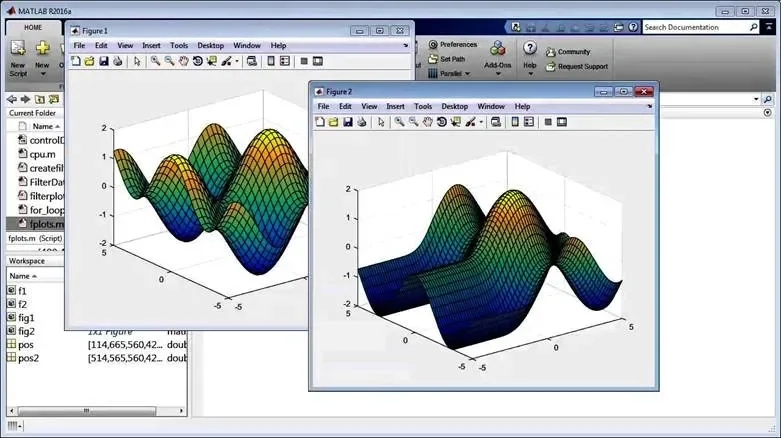
Choose MATLAB when the work is driven by calculations, data, algorithms, system behavior, simulations, automation scripts, control systems, or technical analysis. MATLAB is useful when the question is about how a system behaves, how data should be processed, or how results should be modeled.
It is especially relevant for engineers and scientists who need numerical computing, matrix operations, data visualization, or simulation-connected workflows. MATLAB can support CAD-related simulations in specific cases, but it is not a CAD drafting package.
If your main output is a calculation, model, script, plot, simulation result, or algorithm, MATLAB is the closer fit.
When to Choose AutoCAD?
Choose AutoCAD when the work is driven by drawings, geometry, dimensions, annotations, layouts, construction documentation, manufacturing drawings, or DWG exchange. AutoCAD is useful when the question is about what must be drawn, measured, shared, or built from.
It is especially relevant for architects, drafters, engineers, designers, construction professionals, and technical teams that need precise CAD output. AutoCAD can support 2D and 3D drafting, but it should not be treated as a replacement for MATLAB’s technical computing environment.
If your main output is a drawing, CAD model, layout, or documentation set, AutoCAD is the closer fit.
How ProSoftStore Helps Buyers Choose
MATLAB vs AutoCAD should be decided by workflow. MATLAB is for technical computing, data analysis, algorithms, simulation-connected workflows, and engineering calculations. AutoCAD is for CAD drafting, 2D/3D design, technical drawings, and documentation.
ProSoftStore helps buyers compare CAD software around real deliverables: drawings, geometry, construction documents, mechanical design files, 3D models, 3D printing workflows, manufacturing handoff, and licensing requirements. That keeps the buying process practical.
If numerical computing, algorithms, or engineering calculations are the primary need, compare Engineering Math & Technical Computing Software. If drafting, DWG geometry, or technical documentation is the primary need, compare current AutoCAD options.
FAQs
What is the main difference between MATLAB vs AutoCAD?
The main difference in MATLAB vs AutoCAD is their purpose. MATLAB is a programming and numeric computing platform used for data analysis, algorithm development, modeling, and technical computing. AutoCAD is CAD software used for precise 2D and 3D drafting, design, modeling, and documentation. MATLAB helps analyze and simulate; AutoCAD helps draw and document.
Is MATLAB a CAD software like AutoCAD?
MATLAB is not CAD software like AutoCAD. MATLAB can support engineering calculations, data processing, algorithms, simulations, and CAD-related analysis workflows in some cases, but it is not a drafting platform for creating standard CAD drawings. AutoCAD is the software category used for CAD geometry, layouts, dimensions, annotations, and drawing documentation.
Is AutoCAD better than MATLAB for drawings?
AutoCAD is better than MATLAB for drawings because AutoCAD is designed for CAD drafting, geometry, dimensions, annotations, layouts, and documentation. MATLAB can create plots and technical visualizations, but those are not the same as CAD drawings. If the deliverable is a DWG file, construction sheet, shop drawing, or technical layout, AutoCAD is the more relevant tool.
Is MATLAB better than AutoCAD for simulation?
MATLAB is usually better than AutoCAD for simulation-related work because MATLAB works with Simulink and other MathWorks tools for modeling, simulation, testing, automation, and result analysis. Simulink works with MATLAB to combine textual and graphical programming, optimize parameters, simulate behavior over time, and analyze results. AutoCAD is not primarily a simulation environment.
Can MATLAB use CAD models?
MATLAB-related workflows can use CAD models in specific simulation contexts. MathWorks documentation says Simscape Multibody can import complete CAD assemblies, including masses, inertias, joints, constraints, and 3D geometry, into a model. That is useful for multibody simulation workflows, but it does not make MATLAB a replacement for CAD drafting software.
Can AutoCAD replace MATLAB?
AutoCAD cannot replace MATLAB when the work requires numerical computing, data analysis, algorithms, control logic, scripts, or simulation result analysis. AutoCAD can create precise drawings and CAD geometry, but MATLAB handles mathematical and analytical workflows. A project may need both: MATLAB for calculation or simulation and AutoCAD for design documentation.
Which should engineers learn first, MATLAB or AutoCAD?
Engineers should learn the tool that matches their work. A civil, architectural, or drafting-focused engineer may need AutoCAD first because drawings and documentation are central. A controls, electrical, mechanical analysis, research, or data-focused engineer may need MATLAB first because calculations and simulations are central. Many engineers benefit from both because engineering projects often need analysis and documentation.
Which costs more: MATLAB vs AutoCAD?
MATLAB vs AutoCAD cost depends on product packages, toolboxes, subscriptions, region, support, training, and intended use. The important comparison is not which software costs more, but whether the software solves the right workflow problem. MATLAB should be valued against analysis and simulation needs. AutoCAD should be valued against drafting, CAD documentation, specialized toolsets, and file exchange needs.